ຄູ່ມື service.happyerp.la — ສຳລັບບໍລິສັດດູແລເພຈ
service.happyerp.la ຄືໜ້າຈໍດຽວຂອງບໍລິສັດດູແລເພຈ (1 ຄົນ + ທີມ AI 6 ຕຳແໜ່ງ) ທີ່ດູແລຫຼາຍຮ້ານ: ລາຍຊື່ລູກຄ້າ · ເປີດວຽກ 8 ຂັ້ນ · ປຶ້ມແບຣນ · ບົດເດືອນ · ໃຫ້ AI ຮ່າງວຽກ · ເປີດແອັບຂອງຮ້ານລູກຄ້າ (ຮ້ານທີ່ໃຊ້ Happy ERP ແລະ ໃຫ້ລະຫັດຍິນຍອມແລ້ວ). ໜ້ານີ້ສຳລັບເຈົ້າຂອງບໍລິສັດ ແລະ ສະມາຊິກທີມ · ອັບເດດ 24 ກັນຍາ 2026.
ເຈົ້າຂອງຮ້ານທີ່ຢາກໃຫ້ບໍລິສັດເຂົ້າມາດູແລ ອ່ານ ຄູ່ມືຮ້ານ › 🏢 ບໍລິສັດດູແລເພຈ ແທນ.
1 · ສະໝັກ ແລະ ເຂົ້າສູ່ລະບົບ
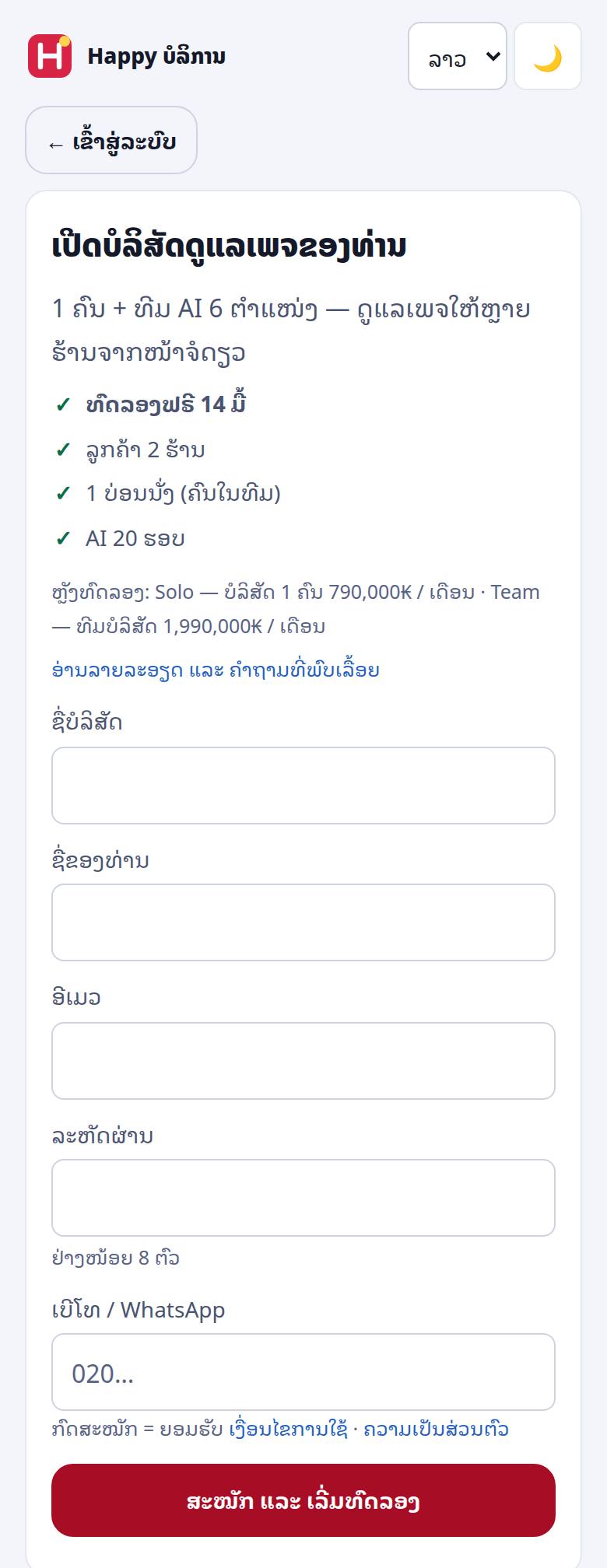
- ເປີດ service.happyerp.la → ກົດ ເປີດບໍລິສັດດູແລເພຈ → (ປຸ່ມນີ້ຂຶ້ນເມື່ອເປີດຮັບສະໝັກຢູ່)
- ໃສ່ ຊື່ບໍລິສັດ · ຊື່ຂອງທ່ານ · ອີເມວ · ລະຫັດຜ່ານ (ຢ່າງໜ້ອຍ 8 ຕົວ) · ເບີໂທ/WhatsApp (8–15 ຕົວເລກ)
- ຮັບສະໝັກມີ 3 ແບບ (Happy ເປັນຜູ້ຕັ້ງ): ເປີດ = ສະໝັກໄດ້ເລີຍ · ດ້ວຍລະຫັດເຊີນ = ຕ້ອງໃສ່ລະຫັດ (ຂໍທີ່ support@happyerp.la) · ປິດຊົ່ວຄາວ = ຂຽນຫາເຮົາ ແລ້ວເຮົາແຈ້ງເມື່ອເປີດ
- ສະໝັກແລ້ວເຂົ້າລະບົບເປັນເຈົ້າຂອງບໍລິສັດທັນທີ ແລະ ເລີ່ມທົດລອງຟຣີ — ຕອນນີ້ 14 ມື້ · ລູກຄ້າ 2 ຮ້ານ · 1 ບ່ອນນັ່ງ · AI 20 ຮອບ (ຕົວເລກທີ່ໃຊ້ຈິງ ສະແດງຢູ່ໜ້າສະໝັກ)
- ຄັ້ງຕໍ່ໄປ: ອີເມວ + ລະຫັດຜ່ານ · ຖ້າເປີດຢືນຢັນ 2 ຊັ້ນ ຈະມີລະຫັດ 6 ຕົວສົ່ງເຂົ້າ Telegram ຂອງທ່ານ — ຕິກ ຈື່ເຄື່ອງນີ້ 30 ມື້ ເພື່ອບໍ່ຖາມທຸກເທື່ອ
2 · ແພັກ ແລະ ຄ່າບໍລິການ (ເຈົ້າຂອງເທົ່ານັ້ນ)
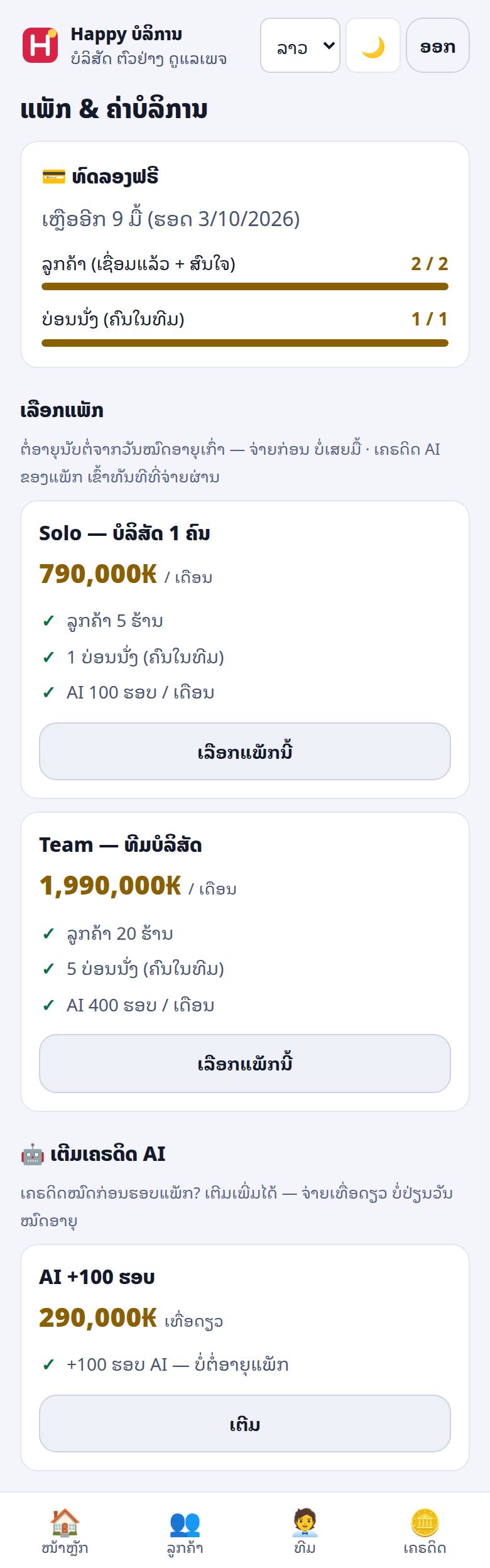
- ແພັກ: Solo (ບໍລິສັດ 1 ຄົນ) ແລະ Team (ທີມບໍລິສັດ) — ແຕ່ລະແພັກມີ ຈຳນວນລູກຄ້າ · ບ່ອນນັ່ງ (ຄົນໃນທີມ) · AI ຮອບ/ເດືອນ · ເຕີມ AI = ຈ່າຍເທື່ອດຽວ ບໍ່ຕໍ່ອາຍຸ. ລາຄາປັດຈຸບັນຢູ່ happyerp.la/agency
- ຈ່າຍ: ກົດປຸ່ມ ເລືອກແພັກ/ຕໍ່ອາຍຸ ໃນແຖບປ້າຍເທິງສຸດ → ເລືອກແພັກ → ສະແກນ QR (ຍອດ ແລະ ລະຫັດອ້າງອີງຝັງໃນ QR ເມື່ອມີ) ຫຼື ໂອນຕາມເລກບັນຊີ ໃສ່ລະຫັດອ້າງອີງໃນໝາຍເຫດ → ແປະສະລິບ → ສົ່ງ
- ສະລິບຜ່ານການກວດກັບທະນາຄານ = ຕໍ່ອາຍຸທັນທີ ແລະ ເຄຣດິດ AI ຂອງແພັກເຂົ້າທັນທີ (ແພັກ × ຈຳນວນເດືອນ) · ບໍ່ຜ່ານອັດຕະໂນມັດ = ສົ່ງໃຫ້ Happy ກວດແລ້ວ (ລໍ) — ໂອນຜິດ ຫຼື ຢາກປ່ຽນແພັກ ກົດ ຖອນຄຳຂໍ ກ່ອນ
- ໂອນຢູ່ເຄົາເຕີ ບໍ່ມີສະລິບ → ໂອນແລ້ວ ຍັງບໍ່ມີສະລິບ — ທີມ Happy ກວດກັບບັນຊີແລ້ວຕໍ່ໃຫ້
- ຕໍ່ອາຍຸນັບຕໍ່ຈາກວັນໝົດອາຍຸເກົ່າ — ຈ່າຍກ່ອນ ບໍ່ເສຍມື້ · ປະຫວັດການຊຳລະ: ຜ່ານແລ້ວ · ລໍກວດ · ບໍ່ຜ່ານ · ຖອນແລ້ວ
- ສະມາຊິກທີມຈ່າຍບໍ່ໄດ້ — ເຫັນຂໍ້ຄວາມ “ບອກເຈົ້າຂອງບໍລິສັດໃຫ້ຕໍ່ອາຍຸ”
3 · ໜ້າຫຼັກ — ທີມ AI 6 ຕຳແໜ່ງ
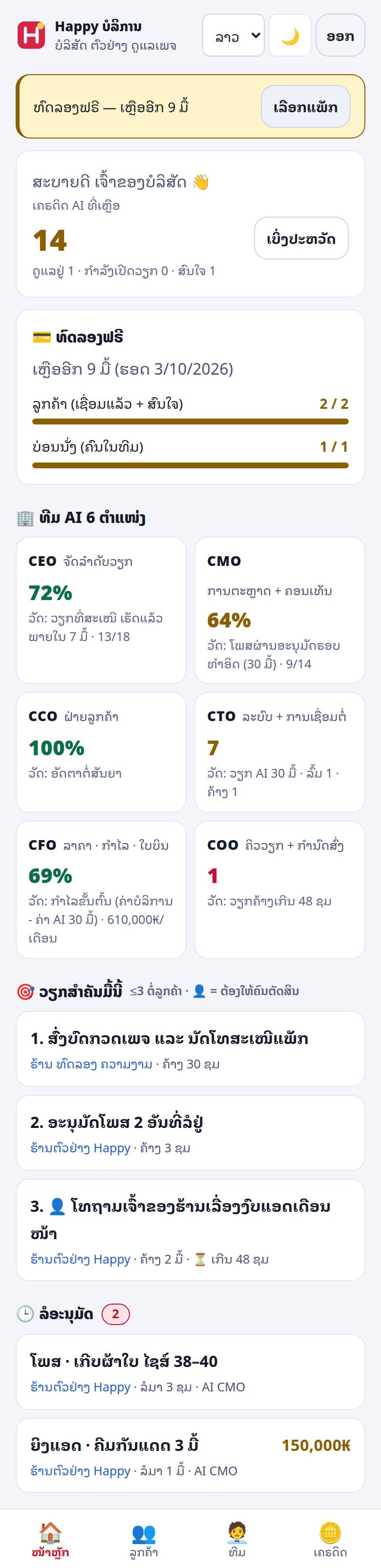
- ປ້າຍເທິງສຸດ: ທົດລອງເຫຼືອ N ມື້ · ແພັກໃກ້ໝົດ (≤7 ມື້) · ໝົດອາຍຸ = ອ່ານໄດ້ຢ່າງດຽວ (ເບິ່ງ ພາກ 10)
- 6 ຕຳແໜ່ງ ແຕ່ລະອັນມີຕົວວັດຂອງຕົນ: CEO ຈັດລຳດັບວຽກ (ວຽກທີ່ສະເໜີ ເຮັດແລ້ວພາຍໃນ 7 ມື້) · CMO ການຕະຫຼາດ+ຄອນເທັນ (ໂພສຜ່ານອະນຸມັດຮອບທຳອິດ) · CCO ຝ່າຍລູກຄ້າ (ອັດຕາຕໍ່ສັນຍາ) · CTO ລະບົບ+ການເຊື່ອມຕໍ່ (ວຽກ AI 30 ມື້ · ລົ້ມ · ຄ້າງ) · CFO ລາຄາ·ກຳໄລ·ໃບບິນ (ຄ່າບໍລິການ − ຄ່າ AI 30 ມື້) · COO ຄິວວຽກ+ກຳນົດສົ່ງ (ວຽກຄ້າງເກີນ 48 ຊມ)
- ວຽກສຳຄັນມື້ນີ້: ບໍ່ເກີນ 3 ຂໍ້ຕໍ່ລູກຄ້າ · 👤 = ຕ້ອງໃຫ້ຄົນຕັດສິນ
- ລໍອະນຸມັດ: ວຽກທີ່ລໍຢູ່ຂ້າມທຸກລູກຄ້າ ພ້ອມເວລາທີ່ລໍ · ເກີນ 48 ຊມ ຕິດປ້າຍ
- ເຄຣດິດ AI ທີ່ເຫຼືອ + ເຕືອນເມື່ອໃກ້ໝົດ/ໝົດ · ບັດແພັກ: ເຫຼືອຈັກມື້ · ລູກຄ້າ ແລະ ບ່ອນນັ່ງ ໃຊ້ໄປ/ສູງສຸດ
4 · ເພີ່ມລູກຄ້າ (ແຖບ ລູກຄ້າ)
ກ · ຮ້ານທີ່ໃຊ້ Happy ERP — ດ້ວຍລະຫັດຈາກຮ້ານ
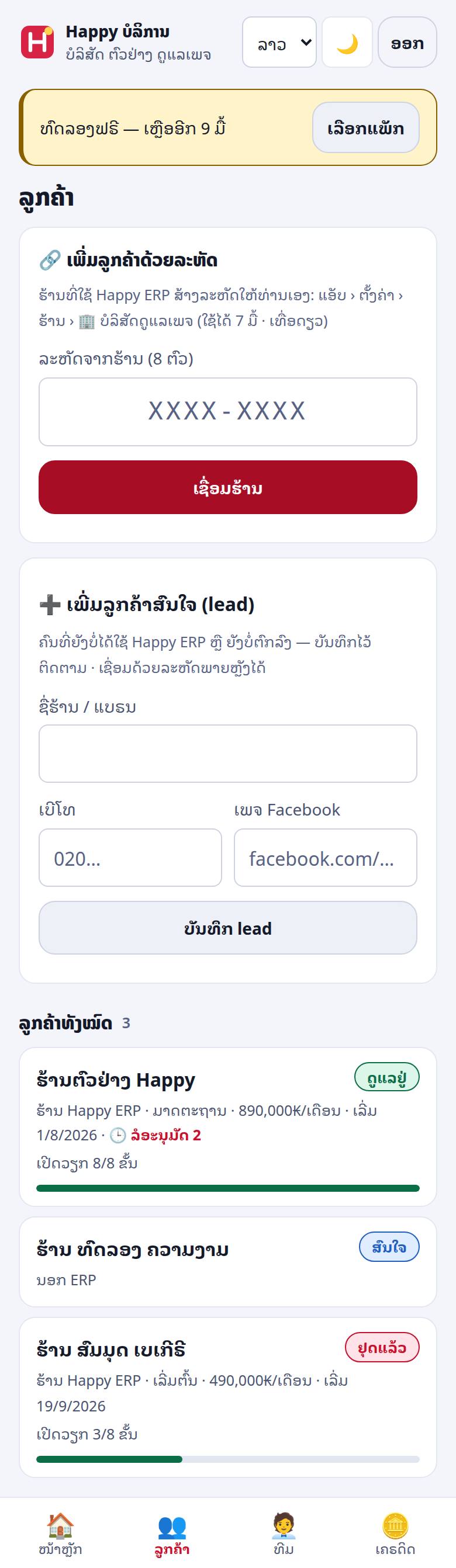
- ໃຫ້ເຈົ້າຂອງຮ້ານເປີດ app.happyerp.la › ຕັ້ງຄ່າ › ຮ້ານ › 🏢 ບໍລິສັດດູແລເພຈ → ສ້າງລະຫັດໃຫ້ບໍລິສັດ ແລ້ວສົ່ງລະຫັດໃຫ້ທ່ານ
- ລະຫັດມີ 8 ຕົວ ເຊັ່ນ
ABCD-EFGH· ໃຊ້ໄດ້ 7 ມື້ · ເທື່ອດຽວ - ໃສ່ໃນ ເພີ່ມລູກຄ້າດ້ວຍລະຫັດ → ເຊື່ອມຮ້ານ → ຂຶ້ນ “✓ ເຊື່ອມ … ແລ້ວ” ແລະ ຮ້ານຢູ່ໃນລາຍຊື່
ຂ · ຮ້ານທີ່ຍັງບໍ່ໃຊ້ ERP ຫຼື ຍັງບໍ່ຕົກລົງ — ລູກຄ້າສົນໃຈ
ໃສ່ ຊື່ຮ້ານ/ແບຣນ · ເບີໂທ (8–15 ຕົວເລກ) · ເພຈ Facebook → ບັນທຶກລູກຄ້າສົນໃຈ. ເບີເກົ່າທີ່ເຄີຍບັນທຶກ = ເປີດບັດເກົ່າໃຫ້ (ບໍ່ຊ້ຳ). ພໍຮ້ານເຂົ້າ ERP ແລ້ວ ເຊື່ອມດ້ວຍລະຫັດພາຍຫຼັງໄດ້.
- ລາຍຊື່ບອກ: ສະຖານະ (ສົນໃຈ · ກຳລັງເປີດວຽກ · ດູແລຢູ່ · ພັກ · ຢຸດແລ້ວ) · ຮ້ານ Happy ERP / ນອກ ERP · ເປີດວຽກ x/8 ຂັ້ນ · ລໍອະນຸມັດ
- ລູກຄ້າທີ່ເຊື່ອມແລ້ວ + ລູກຄ້າສົນໃຈ ທີ່ຍັງບໍ່ “ຢຸດແລ້ວ” ນັບເຂົ້າເພດານລູກຄ້າຂອງແພັກ
5 · ໜ້າລູກຄ້າ — ຂໍ້ມູນສັນຍາ · 8 ຂັ້ນ · ປຶ້ມແບຣນ
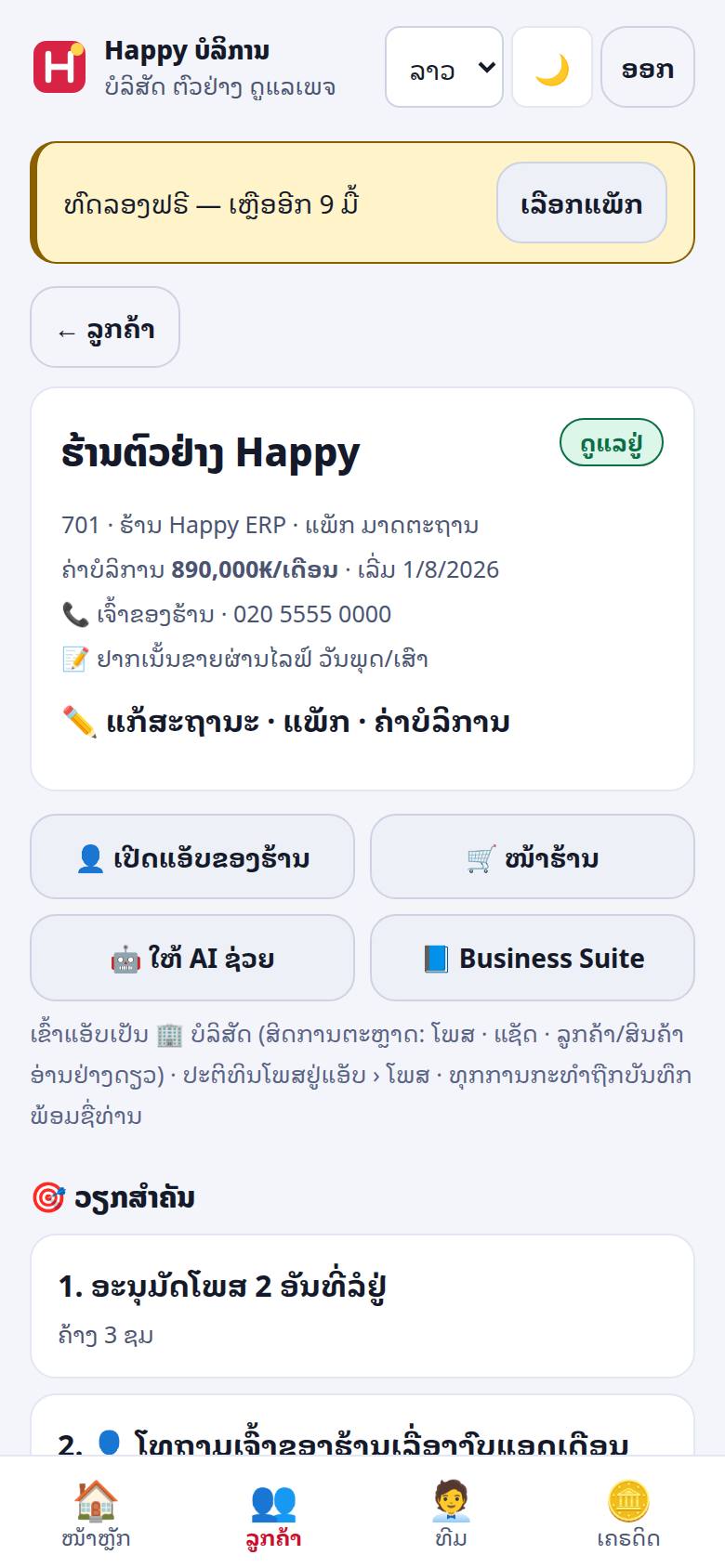
- ຫົວບັດ: ຊື່ · ສະຖານະ · ແພັກ · ຄ່າບໍລິການ/ເດືອນ · ວັນເລີ່ມ · ຜູ້ຕິດຕໍ່ · ໝາຍເຫດ — ແກ້ໃນ ✏️ ແກ້ສະຖານະ · ແພັກ · ຄ່າບໍລິການ (ຂໍ້ມູນສັນຍາລະຫວ່າງທ່ານກັບລູກຄ້າ)
- ປຸ່ມ: 👤 ເປີດແອັບຂອງຮ້ານ (ພາກ 8) · 🛒 ໜ້າຮ້ານ · 🤖 ໃຫ້ AI ຊ່ວຍ · 📘 Business Suite
- 🎯 ວຽກສຳຄັນ ແລະ 🕒 ລໍອະນຸມັດ ຂອງລູກຄ້ານີ້
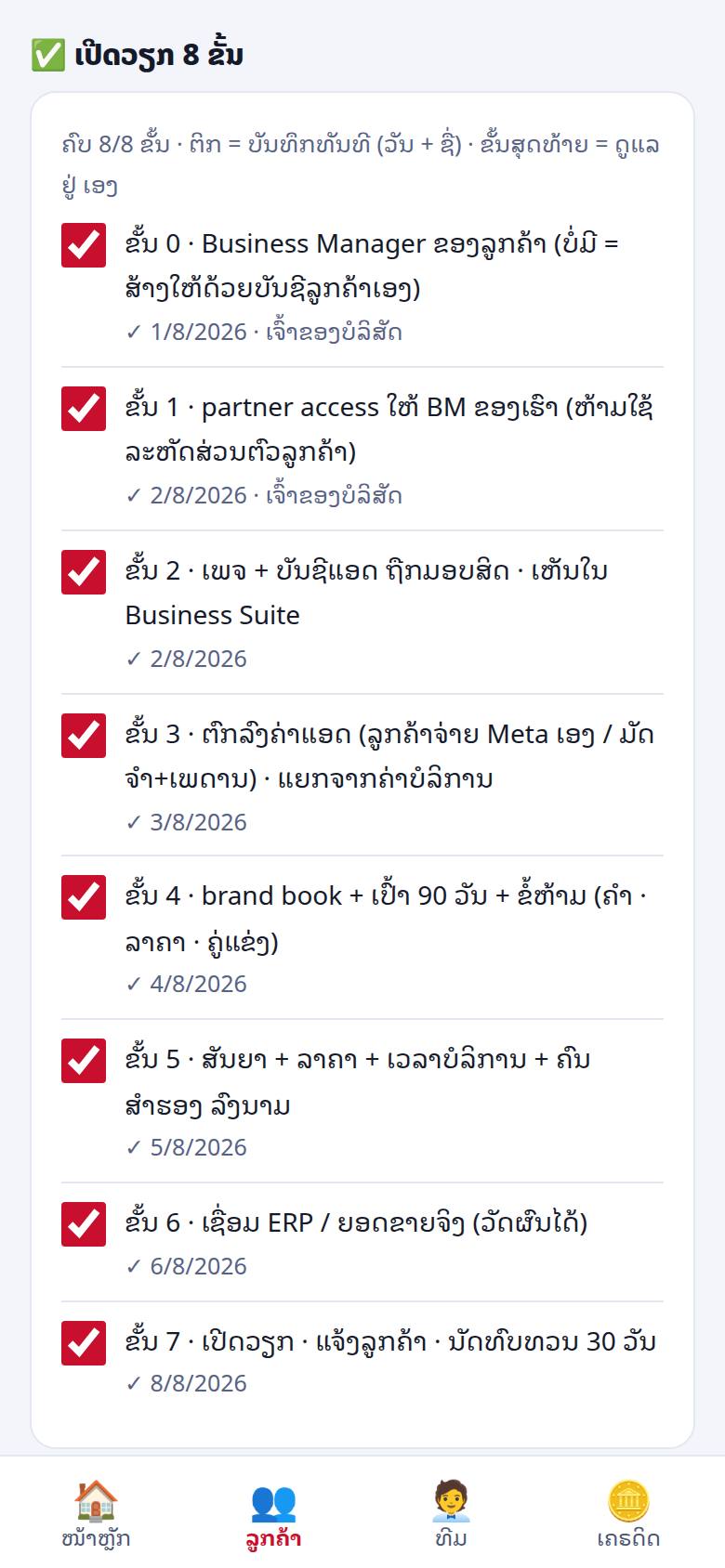
- ✅ ເປີດວຽກ 8 ຂັ້ນ — ຕິກ = ບັນທຶກທັນທີ (ວັນ + ຊື່ຄົນຕິກ) · ຕິກຂັ້ນສຸດທ້າຍ = ສະຖານະເປັນ ດູແລຢູ່ ເອງ:
- Business Manager ຂອງລູກຄ້າ (ບໍ່ມີ = ສ້າງດ້ວຍບັນຊີລູກຄ້າເອງ — ຄູ່ມື BM)
- ມອບສິດຄູ່ຮ່ວມງານ ໃຫ້ BM ຂອງທ່ານ — ຫ້າມໃຊ້ລະຫັດສ່ວນຕົວຂອງລູກຄ້າ
- ເພຈ + ບັນຊີແອດ ຖືກມອບສິດ ແລະ ເຫັນໃນ Business Suite
- ຕົກລົງຄ່າແອດ (ລູກຄ້າຈ່າຍ Meta ເອງ ຫຼື ມັດຈຳ + ເພດານ) — ແຍກຈາກຄ່າບໍລິການ
- ປຶ້ມແບຣນ + ເປົ້າ 90 ວັນ + ຂໍ້ຫ້າມ (ຄຳ · ລາຄາ · ຄູ່ແຂ່ງ)
- ສັນຍາ + ລາຄາ + ເວລາບໍລິການ + ຄົນສຳຮອງ ລົງນາມ
- ເຊື່ອມ ERP / ຍອດຂາຍຈິງ (ວັດຜົນໄດ້)
- ເປີດວຽກ · ແຈ້ງລູກຄ້າ · ນັດທົບທວນ 30 ວັນ
- 📘 ປຶ້ມແບຣນ (ສູງສຸດ 4,000 ຕົວ): ນ້ຳສຽງ · ຄຳຫ້າມ · ຈຸດຂາຍ · ສີ/ໂລໂກ້ · ຄູ່ແຂ່ງ — AI ອ່ານອັນນີ້ທຸກຄັ້ງກ່ອນເຮັດວຽກໃຫ້ລູກຄ້ານີ້
6 · ບົດເດືອນ ແລະ ລິ້ງໃຫ້ລູກຄ້າ
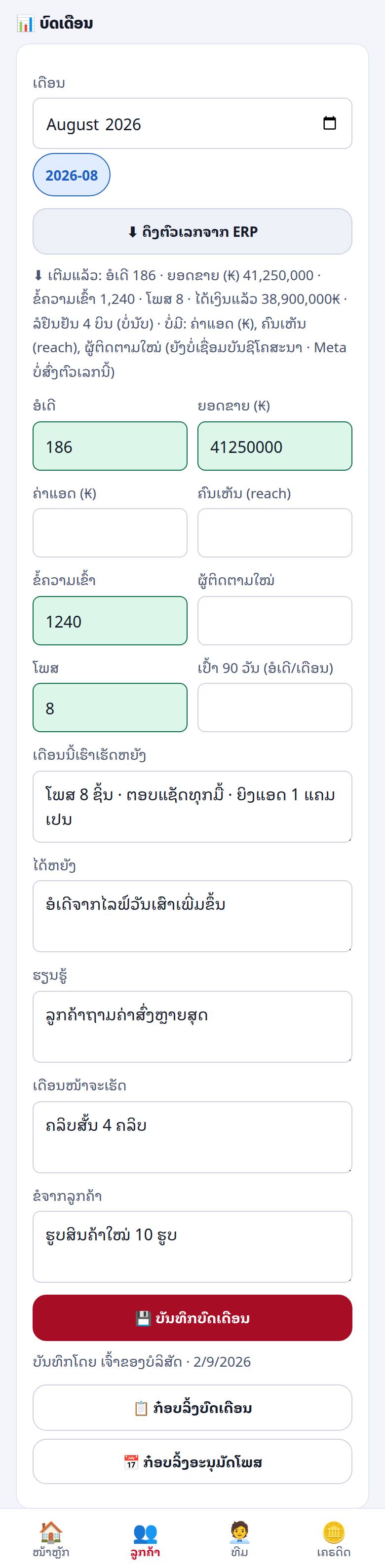
- ຕັ້ງສະຖານະລູກຄ້າກ່ອນ (✏️) ຈຶ່ງໃຊ້ສ່ວນນີ້ໄດ້ → ເລືອກເດືອນ
- ຮ້ານ ERP: ກົດ ⬇ ດຶງຕົວເລກຈາກ ERP — ເຕີມ ອໍເດີ · ຍອດຂາຍ (ນັບສະເພາະບິນທີ່ໄດ້ເງິນແລ້ວ · ບິນລໍຢືນຢັນບອກແຍກ ບໍ່ນັບ) · ຂໍ້ຄວາມ · ໂພສ ໃຫ້ເອງ. ເຕີມສະເພາະຊ່ອງທີ່ຫວ່າງ — ບໍ່ທັບຕົວເລກທີ່ພິມໄວ້. ຄ່າແອດ · ຄົນເຫັນ (reach) · ຜູ້ຕິດຕາມໃໝ່ ພິມເອງຈາກ Meta · ລູກຄ້ານອກ ERP ພິມເອງທັງໝົດ
- ຂຽນ 5 ສ່ວນ: ເດືອນນີ້ເຮົາເຮັດຫຍັງ · ໄດ້ຫຍັງ · ຮຽນຮູ້ · ເດືອນໜ້າຈະເຮັດ · ຂໍຈາກລູກຄ້າ → ບັນທຶກບົດເດືອນ
- ກ໋ອບລິ້ງບົດເດືອນ → ສົ່ງໃຫ້ລູກຄ້າ: ລິ້ງລັບ
happyerp.la/report/…ເປີດໃນມືຖືໄດ້ເລີຍ ບໍ່ຕ້ອງລ໋ອກອິນ · ຕົວເລກທຽບກັບເດືອນກ່ອນ - ກ໋ອບລິ້ງອະນຸມັດໂພສ (ຮ້ານ ERP · ເດືອນນີ້) → ໜ້າ
happyerp.la/approve/…: ເຈົ້າຂອງຮ້ານເຫັນຮ່າງໂພສພ້ອມຮູບ ແລະ ເວລານັດ · ພາບລວມເດືອນຢູ່ເທິງ · ກົດ ✅ ອະນຸມັດ ຫຼື ✕ ສົ່ງຄືນ ພ້ອມໝາຍເຫດ · ລິ້ງມີອາຍຸ
7 · 🤖 AI ແລະ ເຄຣດິດ
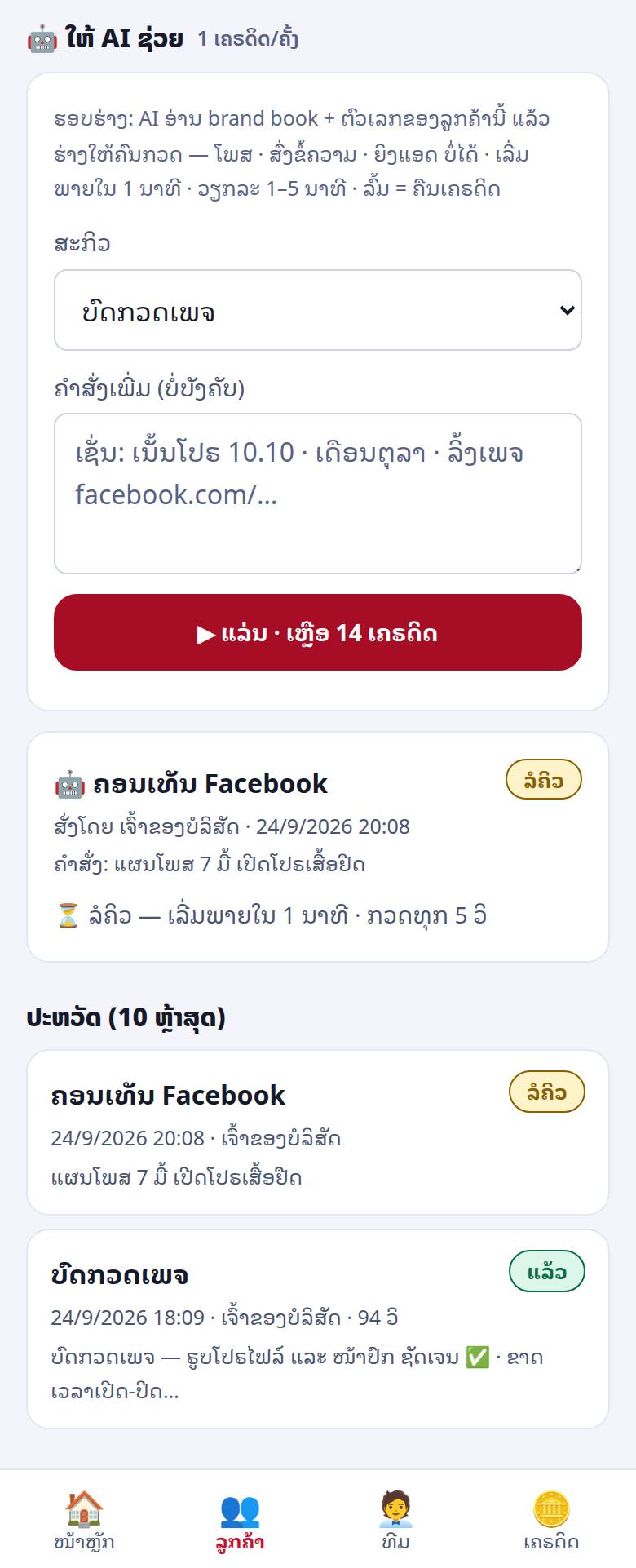
- ໃນໜ້າລູກຄ້າ › 🤖 ໃຫ້ AI ຊ່ວຍ: ເລືອກສະກິວ → ພິມຄຳສັ່ງເພີ່ມ (ບໍ່ບັງຄັບ ເຊັ່ນ “ເນັ້ນໂປຣ 10.10”) → ແລ່ນ
- ສະກິວ: ບົດກວດເພຈ · ເປີດວຽກລູກຄ້າໃໝ່ · ໂຮງງານຄອນເທັນ · ຄອນເທັນ Facebook · ຄອນເທັນ TikTok · ອອກແບບໂປຣ/ຂໍ້ສະເໜີ · ຄຳສັ່ງສ້າງຄຣີເອທີບ · ຮັບມືວິກິດ · ເຝົ້າຄູ່ແຂ່ງ · ຮັກສາລູກຄ້າ · ຮ່າງບົດເດືອນ · ແອດຖືກປະຕິເສດ · ຄຸມງົບແອດ · ຄັດ KOL · ສະຄິບຂາຍໜ້າຮ້ານ
- ເຂົ້າຄິວ → ເລີ່ມພາຍໃນ ~1 ນາທີ · ວຽກລະ 1–5 ນາທີ · ໜ້າຈໍກວດໃຫ້ທຸກ 5 ວິ · ຈົບແລ້ວ ກ໋ອບຜົນ · ປະຫວັດ 10 ວຽກຫຼ້າສຸດ ພ້ອມຊື່ຄົນສັ່ງ
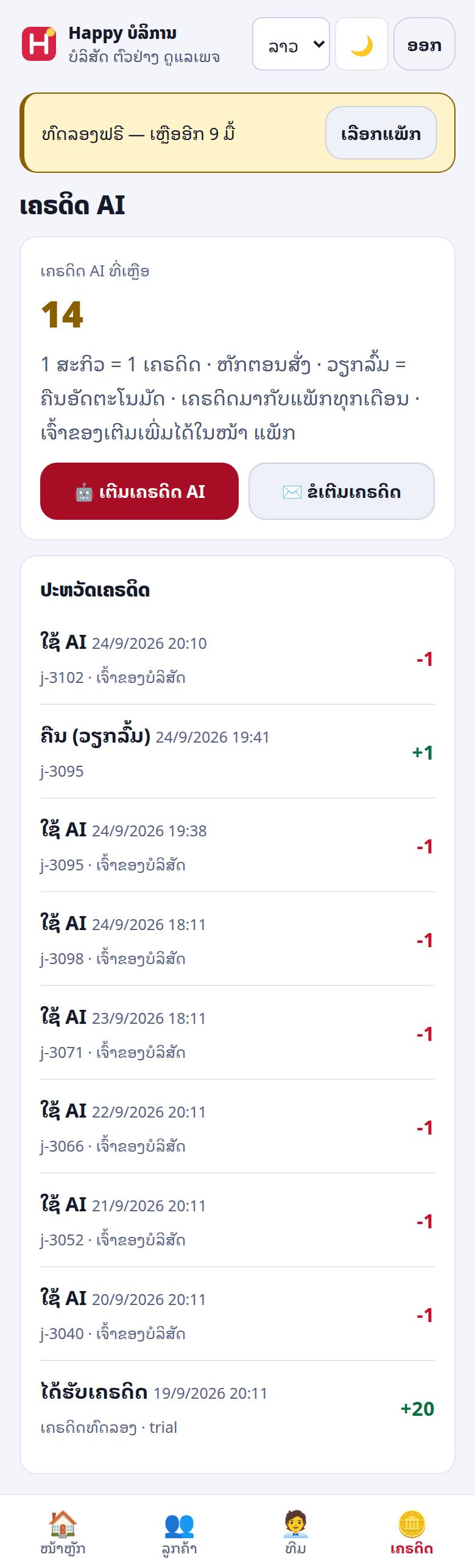
- 1 ສະກິວ = 1 ເຄຣດິດ (ສະກິວສ້າງຄອນເທັນ ແລະ ບົດລາຍງານລູກຄ້າ = 2 ເຄຣດິດ · ຈຳນວນບອກກ່ອນສັ່ງ) — ຫັກຕອນສັ່ງ · ວຽກລົ້ມ = ຄືນເຄຣດິດເອງ
- AI ຮ່າງໃຫ້ຄົນກວດເທົ່ານັ້ນ: ອ່ານປຶ້ມແບຣນ + ຕົວເລກຂອງລູກຄ້ານັ້ນ · ໂພສ · ສົ່ງຂໍ້ຄວາມ · ຍິງແອດ ເອງບໍ່ໄດ້
- ສັ່ງຖີ່ເກີນ ຫຼື ຄິວເຕັມ → “ເກີນເພດານ … ລໍບຶດໜຶ່ງ” · ຄ່າ AI ເດືອນນີ້ເຕັມ (ເພດານລວມທີ່ Happy ຕັ້ງ) → “ຄ່າ AI ເດືອນນີ້ເຕັມ — ຕິດຕໍ່ Happy” — ບໍ່ຫັກເຄຣດິດ · ເລີ່ມໃໝ່ເດືອນໜ້າ
- ແຖບ ເຄຣດິດ: ຍອດເຫຼືອ + ປະຫວັດ (ໄດ້ຮັບເຄຣດິດ · ໃຊ້ AI · ຄືນ (ວຽກລົ້ມ) · ປັບໂດຍ Happy) · ເຄຣດິດມາກັບແພັກ · ເຈົ້າຂອງເຕີມເອງທີ່ ແພັກ & ຄ່າບໍລິການ › ເຕີມເຄຣດິດ AI · ສະມາຊິກກົດ ✉️ ຂໍເຕີມເຄຣດິດ ໃນແຖບ ເຄຣດິດ ຫຼື ບອກເຈົ້າຂອງ
8 · ເປີດແອັບຂອງຮ້ານ — ບ່ອນນັ່ງ 🏢
ໃຊ້ໄດ້ສະເພາະຮ້ານ Happy ERP ທີ່ເຊື່ອມດ້ວຍລະຫັດ ແລະ ສິດຍັງບໍ່ຖືກຍົກເລີກ.
- ໜ້າລູກຄ້າ → 👤 ເປີດແອັບຂອງຮ້ານ → ຢືນຢັນ
- ລະບົບອອກລິ້ງເທື່ອດຽວ (ໃຊ້ໄດ້ 2 ນາທີ) ແລ້ວເປີດ app.happyerp.la ໃນນາມ 🏢 ຊື່ບໍລິສັດ — ໃຊ້ໄດ້ 12 ຊົ່ວໂມງ
- ຮ້ານໄດ້ຮັບແຈ້ງເຕືອນທຸກຄັ້ງທີ່ທ່ານເຂົ້າ · ທຸກສິ່ງທີ່ທ່ານເຮັດ ຖືກບັນທຶກໃນ ກິດຈະກຳ ຂອງຮ້ານ ເປັນ “🏢 ບໍລິສັດ · ຊື່ທ່ານ”
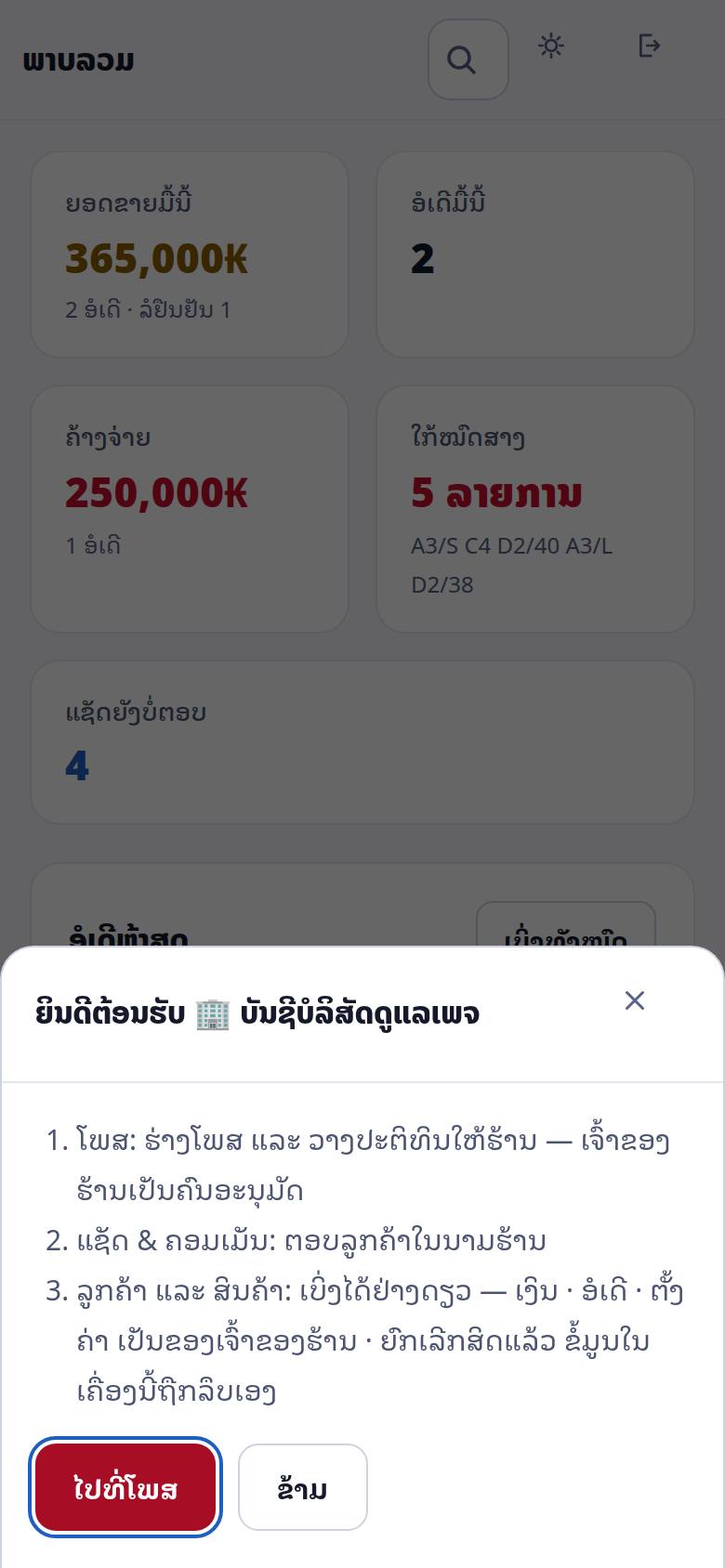
| ເຮັດໄດ້ | ເຮັດບໍ່ໄດ້ / ບໍ່ເຫັນ |
|---|---|
| ໂພສ ແລະ ປະຕິທິນໂພສ (ຮ່າງ → ສົ່ງໃຫ້ຮ້ານອະນຸມັດ) ແຊັດ ແລະ ຄອມເມັນ — ຕອບລູກຄ້າໃນນາມຮ້ານ ລາຍຊື່ລູກຄ້າ · ສິນຄ້າ · ສະຖານະອໍເດີຂອງລູກຄ້າ (ອ່ານຢ່າງດຽວ · ບໍ່ມີຍອດເງິນ) ໜ້າພາບລວມ |
ສ້າງ/ແກ້ອໍເດີ · ເງິນ (ຍອດອໍເດີ · ຍອດຂາຍລາຍວັນ) · ບັນຊີທະນາຄານ · ສະລິບ · ຕົ້ນທຶນ ຕັ້ງຄ່າຮ້ານ · ຄ່າບໍລິການ Happy ຜູ້ໃຊ້ · ລະຫັດຜ່ານ · ການເຊື່ອມຕໍ່ (Facebook token · API) |
9 · ທີມ (ແຖບ ທີມ)
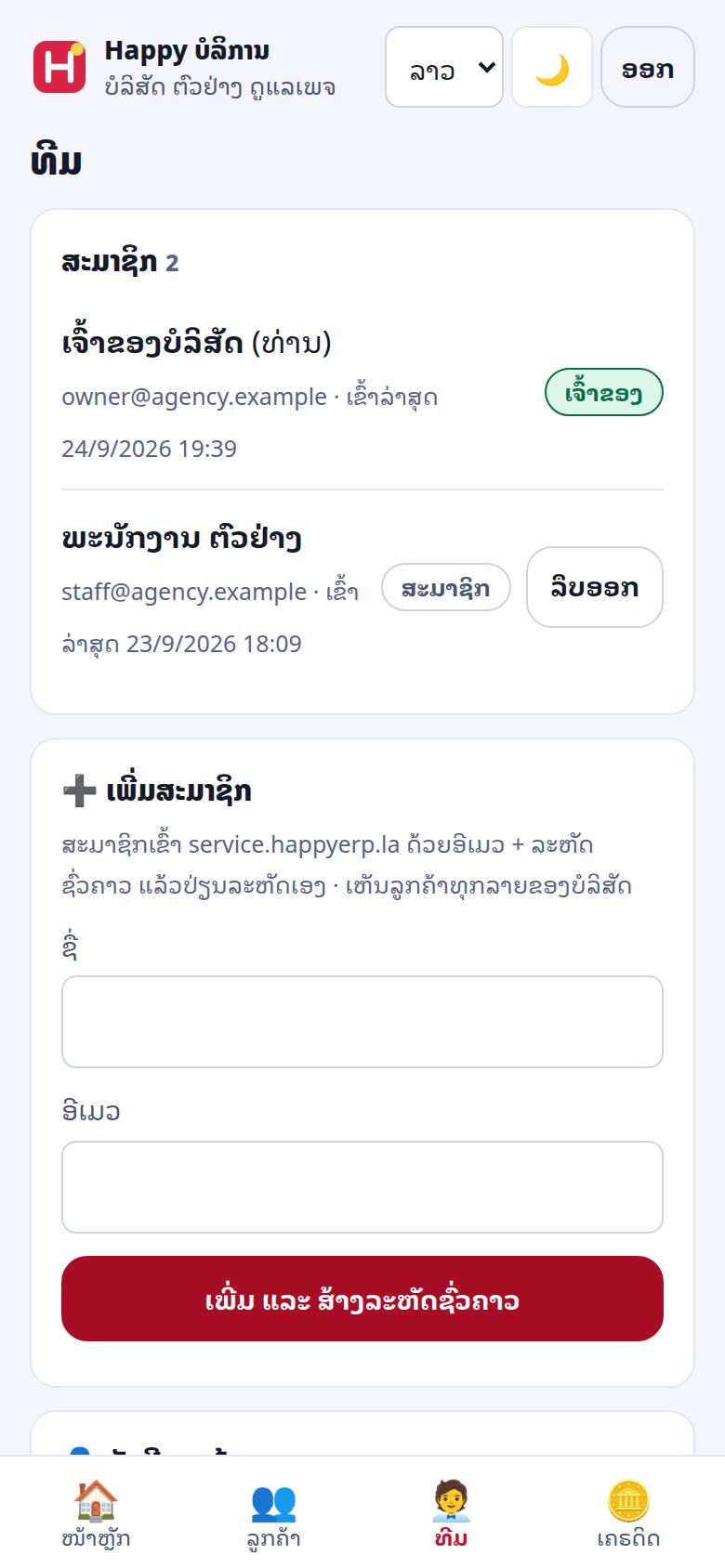
- ເຈົ້າຂອງເພີ່ມສະມາຊິກ: ຊື່ + ອີເມວ → ເພີ່ມ ແລະ ສ້າງລະຫັດຊົ່ວຄາວ → ລະຫັດສະແດງເທື່ອດຽວ — ກ໋ອບສົ່ງທາງແຊັດສ່ວນຕົວ
- ສະມາຊິກເຂົ້າ service.happyerp.la ດ້ວຍອີເມວ + ລະຫັດຊົ່ວຄາວ ແລ້ວປ່ຽນເອງທີ່ ບັນຊີຂອງຂ້ອຍ › ປ່ຽນລະຫັດຜ່ານ
- ສະມາຊິກເຫັນລູກຄ້າທຸກລາຍຂອງບໍລິສັດ ແລະ ເຮັດວຽກໄດ້ຄືເຈົ້າຂອງ ຍົກເວັ້ນ ເພີ່ມ/ລຶບສະມາຊິກ ແລະ ຊຳລະຄ່າແພັກ
- ລຶບອອກ = ຄົນນັ້ນເຂົ້າລະບົບບໍ່ໄດ້ອີກທັນທີ (ເຮັດໄດ້ສະເໝີ ເຖິງແພັກໝົດອາຍຸ) · ລາຍຊື່ບອກເວລາເຂົ້າລ່າສຸດ
- ບ່ອນນັ່ງ = ຈຳນວນຄົນໃນທີມ ລວມເຈົ້າຂອງ — ເກີນເພດານແພັກ ເພີ່ມບໍ່ໄດ້
- ລືມລະຫັດຜ່ານ: ຕິດຕໍ່ support@happyerp.la
10 · ເພດານແພັກ ແລະ ເມື່ອໝົດອາຍຸ
| ເຫດການ | ເກີດຫຍັງ · ເຮັດແນວໃດ |
|---|---|
| ລູກຄ້າເຕັມແພັກ | “ລູກຄ້າເຕັມແພັກແລ້ວ (ສູງສຸດ N ຮ້ານ)” — ອັບເກຣດແພັກ ຫຼື ຕັ້ງລູກຄ້າທີ່ເລີກແລ້ວເປັນ ຢຸດແລ້ວ |
| ບ່ອນນັ່ງເຕັມ | “ບ່ອນນັ່ງເຕັມແພັກແລ້ວ (ສູງສຸດ N ຄົນ)” — ອັບເກຣດ ຫຼື ລຶບຄົນທີ່ບໍ່ໃຊ້ |
| ທົດລອງ/ແພັກໝົດອາຍຸ | ອ່ານໄດ້ຢ່າງດຽວ: ເບິ່ງທຸກຢ່າງໄດ້ · ໜ້າແພັກ ແລະ ເຄຣດິດ ໃຊ້ໄດ້ · ລຶບສະມາຊິກໄດ້ — ແຕ່ເພີ່ມລູກຄ້າ · ແກ້ຂໍ້ມູນ · ແລ່ນ AI · ເປີດແອັບຮ້ານ ບໍ່ໄດ້ ຈົນກວ່າຈະ ຕໍ່ອາຍຸ · ຂໍ້ມູນຍັງຢູ່ຄົບ |
| ແອັບຂອງຮ້ານລູກຄ້າ | ບໍ່ກະທົບ — ຮ້ານຂາຍໄດ້ປົກກະຕິ ບໍ່ວ່າແພັກບໍລິສັດຈະເປັນແນວໃດ |
| ຄ່າ AI ເດືອນນີ້ເຕັມ | AI ບໍ່ຮັບວຽກໃໝ່ຈົນເດືອນໜ້າ (ບໍ່ຫັກເຄຣດິດ) — ຕິດຕໍ່ Happy |
| ບໍລິສັດຖືກປິດຊົ່ວຄາວ | Happy ປິດບັນຊີ — ຕິດຕໍ່ support@happyerp.la |
11 · ຄວາມເປັນສ່ວນຕົວ ແລະ ການຍິນຍອມ
- ການເຂົ້າເຖິງຮ້ານມາຈາກເຈົ້າຂອງຮ້ານເທົ່ານັ້ນ (ລະຫັດທີ່ຮ້ານສ້າງເອງ) — ບໍ່ມີທາງຂໍສິດໂດຍບໍ່ຜ່ານຮ້ານ
- 1 ຮ້ານ = 1 ບໍລິສັດ · ຮ້ານຢາກປ່ຽນບໍລິສັດ ຕ້ອງຍົກເລີກສິດເກົ່າກ່ອນ · ບໍລິສັດໃໝ່ບໍ່ເຫັນບັນທຶກ/ບົດເດືອນຂອງບໍລິສັດເກົ່າ
- ເຈົ້າຂອງຮ້ານຍົກເລີກສິດໄດ້ທຸກເວລາ — ບ່ອນນັ່ງຖືກປິດ ແລະ ທຸກການເຂົ້າທີ່ເປີດຢູ່ຖືກຕັດທັນທີ
- ບ່ອນນັ່ງບໍ່ເຫັນເງິນ · ບັນຊີທະນາຄານ · ສະລິບ · ຕົ້ນທຶນ · ຕັ້ງຄ່າ · ຜູ້ໃຊ້ · ການເຊື່ອມຕໍ່ — ເຊີບເວີເປັນຄົນຕັດອອກ ບໍ່ແມ່ນແຕ່ເຊື່ອງປຸ່ມ
- ທຸກການເຂົ້າ ແລະ ທຸກສິ່ງທີ່ເຮັດ ມີຊື່ຄົນ ຢູ່ໃນກິດຈະກຳຂອງຮ້ານ · ບົດເດືອນດຶງສະເພາະຕົວເລກລວມ (ອໍເດີ · ຍອດຂາຍ · ຂໍ້ຄວາມ · ໂພສ)
- Facebook: ໃຊ້ສິດຄູ່ຮ່ວມງານ ຜ່ານ Business Manager ສະເໝີ (ຄູ່ມື BM) — ຢ່າຂໍລະຫັດຜ່ານລູກຄ້າ · ຂໍ້ມູນລູກຄ້າຂອງຮ້ານ ໃຊ້ເພື່ອບໍລິການຮ້ານນັ້ນເທົ່ານັ້ນ (ນະໂຍບາຍຄວາມເປັນສ່ວນຕົວ · ເງື່ອນໄຂ)
12 · ຂໍ້ຄວາມທີ່ພົບເລື້ອຍ
| ຂໍ້ຄວາມ | ໝາຍຄວາມວ່າ · ເຮັດແນວໃດ |
|---|---|
| ລະຫັດບໍ່ຖືກ | ພິມຜິດ — ກວດ 8 ຕົວ ຫຼື ຂໍລະຫັດໃໝ່ຈາກຮ້ານ |
| ລະຫັດນີ້ຖືກໃຊ້ແລ້ວ · ລະຫັດໝົດອາຍຸ (7 ມື້) | ລະຫັດໃຊ້ໄດ້ເທື່ອດຽວ ພາຍໃນ 7 ມື້ — ຂໍໃໝ່ |
| ຮ້ານນີ້ມີບໍລິສັດອື່ນດູແລຢູ່ | ຮ້ານຕ້ອງຍົກເລີກສິດບໍລິສັດເກົ່າກ່ອນ |
| ເປີດແອັບໄດ້ສະເພາະຮ້ານ Happy ERP ທີ່ເຊື່ອມດ້ວຍລະຫັດ | ລູກຄ້າເປັນລູກຄ້າສົນໃຈ/ນອກ ERP ຫຼື ຖືກຍົກເລີກສິດແລ້ວ |
| ເຄຣດິດໝົດ | ເຈົ້າຂອງເຕີມທີ່ ແພັກ & ຄ່າບໍລິການ › ເຕີມເຄຣດິດ AI · ສະມາຊິກ: ✉️ ຂໍເຕີມເຄຣດິດ ຫຼື ບອກເຈົ້າຂອງ |
| ແພັກໝົດອາຍຸ — ອ່ານໄດ້ຢ່າງດຽວ | ເຈົ້າຂອງກົດ ຕໍ່ອາຍຸ (ພາກ 2) |
| ບັນຊີນີ້ບໍ່ແມ່ນບັນຊີບໍລິສັດດູແລເພຈ | ເປັນບັນຊີຮ້ານ — ເຂົ້າທີ່ app.happyerp.la |
| ລະບົບດູແລລູກຄ້າບໍ່ຕອບຊົ່ວຄາວ | ລອງໃໝ່ໃນບຶດໜຶ່ງ (ລະຫັດຍັງບໍ່ຖືກໃຊ້) |
ຕິດຕໍ່ທີມ Happy: support@happyerp.la
service.happyerp.la guide — for page-care agencies
service.happyerp.la is the one screen for a page-care agency (1 person + a 6-role AI team) that looks after several shops: client list · 8-step onboarding · brand book · monthly reports · AI drafts · opening a client shop's app (shops on Happy ERP that gave you a consent code). This page is for agency owners and team members · updated 24 September 2026.
Shop owners who want to let an agency in should read the shop guide › 🏢 Page-care agency instead.
1 · Sign up and sign in
- Open service.happyerp.la → Start your agency → (shown while sign-up is open)
- Enter agency name · your name · email · password (8+ characters) · phone/WhatsApp (8–15 digits)
- Happy runs sign-up in one of three modes: open = anyone · invite = you need an invite code (ask support@happyerp.la) · closed = write to us and we tell you when it opens
- You are signed in as the agency owner straight away and a free trial starts — currently 14 days · 2 clients · 1 seat · 20 AI runs (the sign-up page shows the live numbers)
- Later: email + password · with two-step verification on, a 6-digit code arrives in your Telegram — tick Remember this device for 30 days
2 · Plans and paying (owner only)
- Plans: Solo (1-person agency) and Team — each sets the number of clients, seats (team members) and AI runs per month · AI top-up = one-off, does not extend time. Current prices: happyerp.la/en/agency
- Pay: tap Choose a plan/Renew in the top banner → choose a plan → scan the QR (amount and reference are inside when available) or transfer to the account shown with the reference in the note → Attach slip → Send
- A slip that passes the bank check = renewed at once and the plan's AI credits are added (plan × months) · otherwise it is sent to Happy for checking — made a mistake or want another plan? Withdraw request first
- Paid at a counter with no slip → Transferred, no slip yet — the Happy team checks the account and renews you
- Renewal is added on top of the current expiry — paying early loses no days · payment history: approved · waiting · rejected · withdrawn
- Team members cannot pay — they see “ask the agency owner to renew”
3 · Home — the 6-role AI team
- Top banner: trial days left · plan expiring (≤7 days) · expired = read-only (see section 10)
- 6 roles, each with its own measure: CEO priorities (suggested tasks done within 7 days) · CMO marketing + content (posts approved first time) · CCO client care (renewal rate) · CTO systems + integrations (AI jobs in 30 days · failed · open) · CFO pricing · margin · invoices (fees − AI cost, 30 days) · COO work queue + deadlines (tasks stuck over 48 h)
- Top tasks today: at most 3 per client · 👤 = needs a human decision
- Awaiting approval: items across all clients with how long they have waited · over 48 h is flagged
- AI credits left + warnings when low/out · plan card: days left · clients and seats used/max
4 · Adding clients (Clients tab)
A · Shops on Happy ERP — with a code from the shop
- The shop owner opens app.happyerp.la › Settings › Shop › 🏢 Page-care agency → Create a code for the agency and sends you the code
- Codes have 8 characters, e.g.
ABCD-EFGH· valid 7 days · single use - Enter it under Add a client with a code → Link shop → “✓ Linked …” and the shop joins your list
B · Shops not on ERP yet, or not signed — a lead
Enter shop/brand name · phone (8–15 digits) · Facebook page → Save lead. A phone you already saved opens the existing card (no duplicates). Link it with a code later once the shop is on ERP.
- The list shows: status (Lead · Onboarding · Active · Paused · Ended) · on Happy ERP / outside ERP · onboarding x/8 · waiting approvals
- Linked clients + leads that are not Ended count toward the plan's client limit
5 · The client page — contract · 8 steps · brand book
- Header: name · status · plan · monthly fee · start date · contact · notes — edit under ✏️ Edit status · plan · fee (your contract record with the client)
- Buttons: 👤 Open the shop's app (section 8) · 🛒 Storefront · 🤖 Ask the AI · 📘 Business Suite
- 🎯 Key tasks and 🕒 awaiting approval for this client
- ✅ 8 onboarding steps — a tick saves at once (date + who ticked) · ticking the last step sets the status to Active:
- The client's Business Manager (none = create it with the client's own account — BM guide)
- Partner access for your BM — never use the client's personal password
- Page + ad account shared and visible in Business Suite
- Ad spend agreed (client pays Meta directly, or deposit + cap) — separate from your fee
- Brand book + 90-day goal + don'ts (words · prices · competitors)
- Contract + price + service hours + backup person signed
- ERP / real sales connected (results can be measured)
- Go live · tell the client · book a 30-day review
- 📘 Brand book (up to 4,000 characters): voice · banned words · selling points · colours/logo · competitors — the AI reads it every time before working for this client
6 · Monthly report and client links
- Set the client's status first (✏️) → pick the month
- ERP shops: tap ⬇ Pull numbers from ERP — orders · sales (paid orders only · pending ones are listed separately, not counted) · messages · posts are filled in. Only empty boxes are filled — numbers you typed are never overwritten. Ad spend · reach · new followers come from Meta and are typed by you · non-ERP clients: type everything
- Write the 5 parts: what we did · results · lessons · next month · what we need from you → Save report
- Copy report link → send it: a private
happyerp.la/report/…link that opens on a phone with no login and compares with last month - Copy post-approval link (ERP shops · this month) →
happyerp.la/approve/…: the owner sees drafts with image and scheduled time · month overview on top · ✅ approve or ✕ send back with a note · links expire
7 · 🤖 AI and credits
- Client page › 🤖 Ask the AI: pick a skill → optional extra instruction (e.g. “push the 10.10 promo”) → Run
- Skills: page audit · new-client onboarding · content factory · Facebook content · TikTok content · offer design · creative brief · crisis comms · competitor watch · churn save · monthly report draft · rejected-ad fix · ad budget guard · KOL shortlist · counter sales script
- Queued → starts within ~1 minute · each job takes 1–5 minutes · the page checks every 5 s · when done, Copy result · history of the last 10 jobs with who ran them
- 1 skill run = 1 credit (content-creation skills and the client report = 2 credits · the cost is shown before you run) — charged when you run it · a failed job refunds the credit automatically
- The AI only drafts for a person to check: it reads the brand book + that client's numbers · it cannot post, message customers or run ads by itself
- Running too often or a full queue → “limit reached … wait a moment” · this month's AI budget is used up (an overall cap set by Happy) → “AI budget for this month is full — contact Happy” — no credit is charged · it resets next month
- Credits tab: balance + history (credits received · AI used · refunded (failed job) · adjusted by Happy) · credits come with your plan · the owner tops up under Plan & billing › Top up AI credits · members can tap ✉️ Request a top-up in the Credits tab or ask the owner
8 · Opening a shop's app — the 🏢 seat
Only for Happy ERP shops linked with a code whose access has not been revoked.
- Client page → 👤 Open the shop's app → confirm
- A one-time link (valid 2 minutes) opens app.happyerp.la as 🏢 your agency — the session lasts 12 hours
- The shop is notified every time you enter · every action is logged in the shop's Activity as “🏢 agency · your name”
| Can do | Cannot do / cannot see |
|---|---|
| Posts and the post calendar (drafts → sent to the shop for approval) Chats and comments — reply to customers as the shop Customer list · products · customers' order status (read only · no amounts) Overview |
Creating/editing orders · money (order amounts · daily sales) · bank accounts · slips · costs Shop settings · Happy billing Users · passwords · integrations (Facebook token · API) |
9 · Team (Team tab)
- The owner adds a member: name + email → Add and create a temporary password → the password is shown once — copy it to the person privately
- The member signs in at service.happyerp.la with email + temporary password and changes it under My account › Change password
- Members see every client of the agency and can do everything the owner can, except adding/removing members and paying for the plan
- Remove = that person can no longer sign in, effective at once (always allowed, even when the plan has expired) · the list shows last sign-in
- Seats = team members including the owner — beyond the plan's limit you cannot add more
- Forgot your password: contact support@happyerp.la
10 · Plan limits and expiry
| Situation | What happens · what to do |
|---|---|
| Client limit reached | “Clients are at the plan limit (max N shops)” — upgrade, or set clients you no longer serve to Ended |
| Seat limit reached | “Seats are at the plan limit (max N people)” — upgrade or remove unused members |
| Trial/plan expired | Read-only: you can view everything · Plans and Credits work · removing members works — but adding clients · editing · running AI · opening shop apps stop until you Renew · all data is kept |
| Client shops' own apps | Never affected — the shop keeps selling whatever state your agency plan is in |
| This month's AI budget is full | No new AI jobs until next month (no credit charged) — contact Happy |
| Agency temporarily disabled | Happy paused the account — contact support@happyerp.la |
11 · Privacy and consent
- Access to a shop comes only from the shop owner (a code the shop creates) — there is no way to request access around the shop
- 1 shop = 1 agency · to switch agencies the shop revokes the old one first · the new agency does not see the previous agency's notes/reports
- The shop owner can revoke at any time — the seat is disabled and open sessions end immediately
- The seat never sees money · bank accounts · slips · costs · settings · users · integrations — the server removes them, it does not just hide buttons
- Every entry and action is named in the shop's Activity · reports fetch totals only (orders · sales · messages · posts)
- Facebook: always use partner access through Business Manager (BM guide) — never ask for a client's password · use the shop's customer data only to serve that shop (privacy policy · terms)
12 · Common messages
| Message | Meaning · what to do |
|---|---|
| Wrong code | Typo — check the 8 characters or ask the shop for a new code |
| Code already used · code expired (7 days) | Codes work once within 7 days — ask for a new one |
| Another agency manages this shop | The shop must revoke the old agency first |
| Only Happy ERP shops linked with a code can be opened | The client is a lead / outside ERP, or access was revoked |
| Out of credits | The owner tops up under Plan & billing › Top up AI credits · members: ✉️ Request a top-up or ask the owner |
| Plan expired — read only | The owner taps Renew (section 2) |
| This is not a page-care agency account | It is a shop account — sign in at app.happyerp.la |
| The client system is not responding | Try again in a moment (the code was not used up) |
Contact the Happy team: support@happyerp.la